Marimar: A Script Font for Web Design
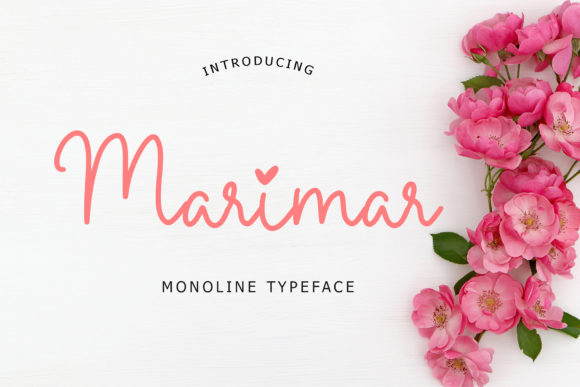
Marimar is a calligraphy font that brings an elegant and playful energy to web design. As a script typeface, it adds personality and visual interest without sacrificing clarity. Its monoline style ensures it remains legible across different screen sizes and digital formats, making it ideal for designers who want to balance creativity with functionality.
Web designers and UI creators often look for fonts that can elevate a design while maintaining readability. Marimar fits this need perfectly. Whether used in headers, buttons, or decorative elements, its flowing strokes and soft curves add a sense of movement and warmth to any layout. This makes it especially useful for branding projects, landing pages, and content sections where visual appeal and user engagement are key.
Marimar in Digital Layouts
When designing for the web, the choice of typography plays a crucial role in shaping the user experience. Marimar excels in areas where a custom, handwritten feel is desired. For example, on a creative portfolio site, using Marimar as a heading can immediately convey a designer’s artistic flair. On a boutique online store, it can be used in banners or product titles to create a more inviting and personal shopping experience.
In hero sections, Marimar can serve as a bold display font that draws attention without overwhelming the viewer. It works well for call-to-action buttons, especially when paired with a simpler sans serif font for contrast. The font’s fluidity also makes it a great option for social media graphics, email newsletters, and digital ads where a unique, eye-catching look is needed.
Readability and Visual Hierarchy
One of the most important considerations when using a script font like Marimar is readability. While it may not be suitable for long paragraphs of body text, it shines in short phrases, headings, and decorative accents. Its consistent stroke width and clean lines ensure it remains legible even at smaller sizes, which is essential for mobile responsiveness.
For mobile screens, it’s best to use Marimar in larger text sizes and avoid placing it over complex backgrounds or image overlays. On dark backgrounds, the font maintains good contrast, but on light backgrounds, it’s important to ensure sufficient spacing between letters to prevent visual clutter. When used in small buttons or icons, it should be paired with a more readable font to maintain usability.
Brand Tone and User Engagement
Typography is a powerful tool for establishing brand tone. Marimar’s playful yet sophisticated style makes it ideal for brands that want to appear both creative and professional. It can help build trust and recognition by creating a consistent visual identity across websites, apps, and digital assets.
For a coaching website, Marimar can be used in headlines to reinforce a friendly and approachable brand voice. In a product landing page, it can highlight key benefits or features with a touch of elegance. On a blog header, it adds a personal and engaging feel that encourages readers to explore further.
Font Pairing and Design Applications
When pairing Marimar with other fonts, the goal is to create a balanced and harmonious look. A common approach is to pair it with a simple sans serif font for body copy, allowing the script font to stand out as a focal point. This combination works well for landing pages, course sales pages, and content-heavy websites where clarity is essential.
For a more editorial feel, Marimar can be paired with a serif font to create a classic and refined aesthetic. This is particularly effective for blog designs, magazine-style websites, or brand kits that require a timeless look. In contrast, pairing it with a modern sans serif can give a more contemporary and dynamic feel, perfect for tech startups or SaaS platforms.
Practical Use Cases
Marimar is versatile enough to work in a variety of design contexts. On a creative portfolio site, it can be used in project titles to draw attention to individual works. In an online store, it can enhance product banners and promotional messages. For a digital brand kit, it can be incorporated into logos, social media profiles, and marketing materials to maintain a cohesive identity.
It’s also useful in course pages, where it can be used for section headings or key takeaways. On a blog header, it adds a personal touch that reflects the writer’s style. For a coaching website, it can be used in testimonials or success stories to make the content more relatable and engaging.
Commercial Licensing and File Formats
Before using Marimar in commercial projects, it’s important to check the licensing terms. Most premium fonts include a license for web use, which allows them to be embedded in websites, apps, and digital templates. However, it’s always wise to confirm the specific rights associated with the font, especially if it will be used in client projects or online stores.
Marimar typically comes in multiple file formats, including OTF and WOFF, ensuring compatibility with different design tools and web platforms. Some versions may also include alternate characters or stylistic sets, giving designers more flexibility in how they use the font. Additionally, multilingual support is often included, making it suitable for global audiences and international branding efforts.
As a script font, Marimar offers a unique blend of beauty and functionality that can enhance a wide range of digital projects. Whether you're designing a website, app interface, or brand asset, it provides a fresh and expressive way to communicate your message. With proper use and pairing, it can become a key element in your design toolkit, helping you create visually compelling and user-friendly experiences.