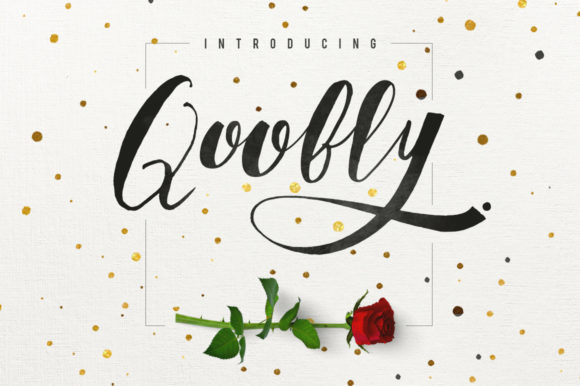
Qoobly: A Handwritten Font for Makers
There I was, standing in my cozy studio, surrounded by candle jars and labels waiting to be printed. I had just finished a batch of soy candles and needed something special to make the packaging stand out. That’s when I reached for Qoobly—a gorgeous handwritten font that brings an authentic brush handcrafted feel to any design.
Qoobly’s Visual Personality
Qoobly has this warm, inviting energy that feels like it was written with a real brush. It’s not too formal, not too casual—it strikes a perfect balance between elegant and approachable. The soft curves and gentle flourishes give it a handmade charm that instantly elevates any project. Whether it’s on a candle label or a greeting card, Qoobly adds a personal touch that feels genuine.
Testing Qoobly on Real Projects
I started by testing Qoobly on a candle label. I typed out the scent name and a short description, and the font looked amazing. The letterforms flowed naturally, and the spacing felt just right. I printed a sample and stuck it on a jar—I could already imagine customers picking it up off the shelf, drawn in by the friendly, handcrafted look.
Next, I tried Qoobly on a sticker sheet. The font held up well even at smaller sizes, though I noticed that some of the finer details got a bit lost. Still, it worked beautifully for short phrases like “Handmade with Love” or “Scented Candle.”
Using Qoobly for Creative Projects
Qoobly is incredibly versatile. I used it on a wedding invitation mockup, where it added a romantic, personal vibe. The font paired nicely with a simple sans serif for the body text, creating a balanced and elegant layout. On a planner page, it brought a sense of creativity and spontaneity, perfect for journaling or daily affirmations.
For a printable wall art project, Qoobly was a standout. I designed a farmhouse-style sign with a quote, and the font gave it that rustic, hand-painted feel. It worked equally well on a tote bag design, where it added a stylish yet accessible look.
Readability and Practical Use
One of the things I love about Qoobly is how readable it is, even at smaller sizes. I tested it on product labels, and it held up well without looking too cluttered. For cutting machines, I found that using a slightly larger size helped maintain clarity, especially on small stickers.
That said, Qoobly isn’t ideal for long paragraphs or dense information. It shines best on short phrases, titles, and decorative elements. If you’re planning to use it on a product label with a lot of text, you might want to pair it with a more legible font for the body copy.
Font Pairing and Design Tips
When pairing Qoobly with other fonts, I found that a clean sans serif like Montserrat or Lato made a great complement. The contrast between the handwritten style and the modern simplicity created a polished, professional look. For a more traditional feel, pairing it with a simple serif like Georgia or Playfair Display also worked well.
If you’re designing for print, make sure to check the font’s weights and alternates. Qoobly offers a range of styles that can add depth and variety to your designs. For digital use, ensure that the webfont format is available if you plan to use it on a website or online store.
What to Consider Before Using Qoobly
Before jumping into a project, I recommend checking the font’s licensing terms. Qoobly is a commercial font, so if you’re selling products or printables, make sure you have the right to do so. Also, verify that it supports the languages you need, especially if you’re targeting international audiences.
Overall, Qoobly is a fantastic choice for makers who want to add a handmade feel to their work. Whether you’re designing labels, invitations, or digital templates, this font brings a unique charm that’s hard to replicate.
Final Thoughts on Qoobly
After using Qoobly on several projects, I can confidently say it’s one of the most enjoyable fonts I’ve worked with. It adds character without being overwhelming, and its versatility makes it a go-to for both print and digital designs. If you’re looking for a font that feels personal and authentic, Qoobly is definitely worth trying.